
How to Search Cases by Name
Colorado Judicial Branch offers a free Clear Creek County docket search. It takes a person's name or a business name. It scans public scheduled hearings across the state court system. Keep its limits in mind. It is not a complete statewide index of every case and every event. Open the prefilled county view first so Clear Creek stays locked in. Then switch to party mode and lean on the narrowest name fields that work reliably.
- Open the official county-filtered calendar and choose a date range or exact date.
- Add Individual or Business mode. For an individual, enter the last name and then the first name. For an entity, use Business Name.
- Add another sound filter, such as court type or case class, when it will not hide a valid match.
- Compare each result by case number, hearing type, location, and date. A name alone may match more than one matter.
- Open, print, or export the result as a working calendar item, then confirm the live setting before relying on it.
One catch: the form demands at least one filter beyond the date. Those fields matter, because a search left empty or too broad simply will not run the way you expect.
| Field Label | Type | Required | Use |
|---|---|---|---|
| County | Dropdown | Location filter | Select Clear Creek County. |
| Date Range | Dropdown | Date plus another filter | Use a span that can include the expected hearing. |
| Individual/Business | Mode selector | Conditional | Switches person and organization fields. |
| First and Last Name | Text | Optional | Use for an individual party search. |
| Business Name | Text | Optional | Use instead of person fields for an entity. |
| Court Type or Division | Dropdown/text | Optional | Narrows results when the assignment is known. |
Clear Creek County Lookup Filters
Date alone won't work in the official search. You must add county, courthouse, court type, division, case-number detail, party, or attorney information. Clear Creek County sits under county code 10 in the official URL. Party search and attorney search run as separate modes. A lawyer's name goes in the attorney fields, never the party boxes.
The official prefiltered interface opens straight to the Clear Creek starting point. Its county and date defaults save a step. Even so, one extra filter remains required.
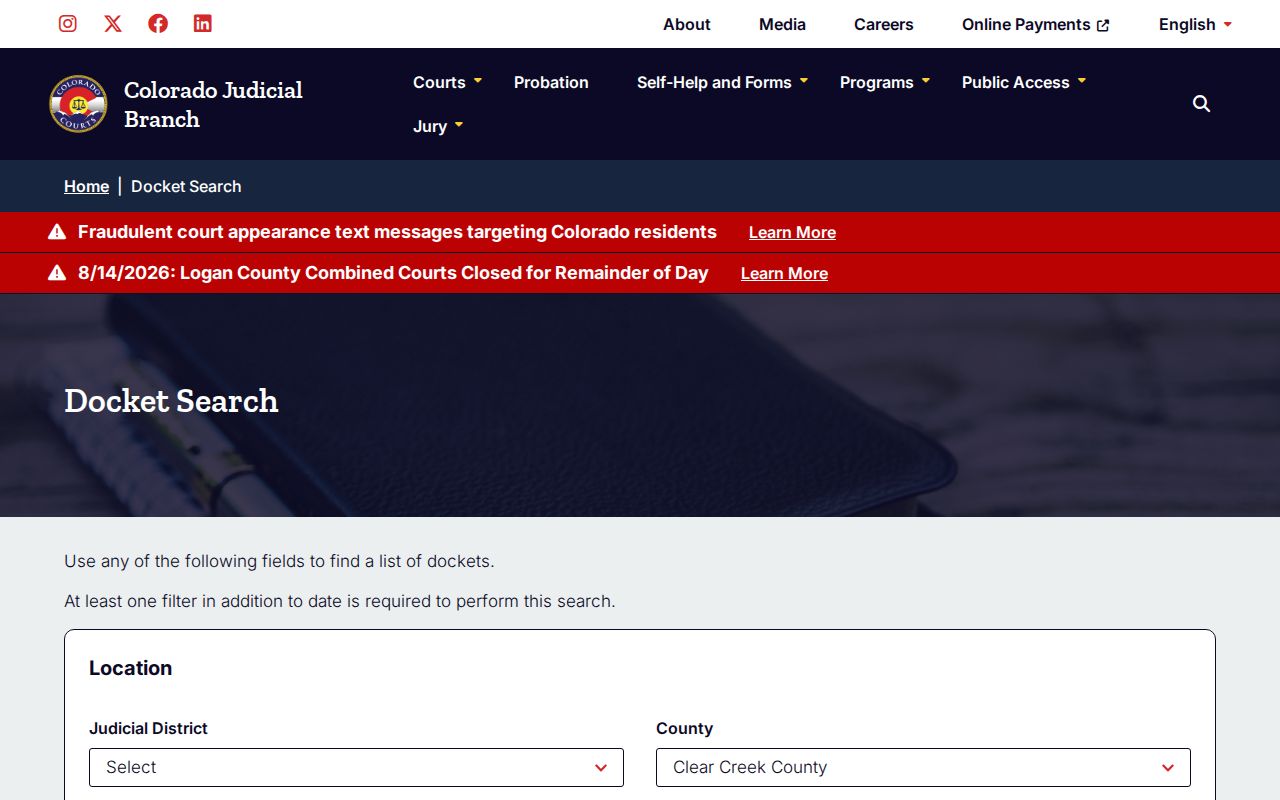
This page works well for a known local matter. It cuts the odds of searching the wrong county. Case, party, attorney, and court controls stay open.
A common name may return several rows. Compare the full case number and hearing details rather than guessing. If nothing appears, widen the date span. Drop one overly specific field at a time. A misspelled name, no current hearing, municipal jurisdiction, restricted access, or an older file can each explain a zero-result search.
Clear Creek County Party Searches
Party mode and attorney mode answer different questions. Use Individual or Business fields to find a named party's scheduled event. Use attorney name or bar number to build a counsel calendar. Mixing them invites an avoidable zero result. The Clear Creek County case lookup routes each input to a different search field.
Neither mode amounts to a full case-history search. A match only shows a public setting within your chosen date span. Always check it against the case number.
How to Search by Case Number
Colorado's calendar splits a Clear Creek County case number into three searchable parts: a four-digit year, a case class, and a sequence. Picture a fictitious traffic example like 2026-T-30123, or a District Court criminal example like 2026-CR-00123. Enter the digits and class exactly as the source document shows them.
Class letters reveal the court and the matter. CR marks District Court criminal cases. M means County Court misdemeanors, T is traffic, and C is County Court civil. DR covers domestic relations and PR covers probate. R has appeared for restraining or protection-order matters. CV commonly flags District Court civil cases, SC small claims, and juvenile classes carry access limits. Some classes use a sequence in the 30000 range.
Transcription quirks like a dropped hyphen or missing leading zero can matter. The public form, though, asks for each component in its own control. If the paper shows an appellate or transferred-case number, search the original and the later number when an order supplies both. The calendar may list the current court without explaining how the file got there.
Clear Creek County Search Gaps
Zero results don't prove a Clear Creek County case is absent. The public tool only searches hearings inside the selected span. A valid case may have no setting right now, may have moved to a new date, may sit in a municipal court, or may be restricted from display. Older material can require clerk research or off-site retrieval.
Fall back in a controlled way. Resist adding random filters.
- Check the county, year, class, and sequence against the newest court paper.
- Broaden the date range and remove an exact first name or other narrow field.
- Identify whether the issuing court is a town municipal court rather than a Colorado County or District Court.
- Call 303-569-0820 or contact ClearCreekClerk@judicial.state.co.us with the case number and party information.
- Ask for a Register of Actions when the goal is the complete public chronology rather than a hearing date.
Visit the clerk counter at 405 Argentine Street in Georgetown. Mail goes to P.O. Box 367, Georgetown, CO 80444. A record request can also travel by the clerk-confirmed email or fax route. Before sending a date of birth or other sensitive identifier, confirm the approved channel. For municipal matters, contact Idaho Springs, Georgetown, Empire, or Silver Plume. The issuing paper directs which one.
Clear Creek County Lookup Exports
Search results can be exported or opened in a printable view. The calendar paginates at 20 visible results per page. Those controls help you manage a long hearing list. They don't freeze the court schedule or certify anything, though, so revisit the live Clear Creek County lookup before the hearing.
Page through every result before concluding a name is absent. With a broad search returning many settings, the matter you want may sit past the first group.
What a Case Search Shows
A Clear Creek County case search result works like a schedule row. Treat it as a calendar line, nothing more. It names the matter and the event. What it cannot do is open the filed pleadings, orders, or document images behind that row. For a full history, turn to the clerk's Register of Actions and, when a specific filing matters, request copies of the named documents themselves.
| Date and start time | The scheduled day and time for the listed event. |
|---|---|
| Estimated duration | The court's time estimate in minutes, hours, or days. |
| Party or business | The displayed name used to help identify a public matter. |
| Case number | The year, class, and sequence that provide the strongest match. |
| Hearing type | The event, such as arraignment, status conference, pretrial conference, or trial. |
| Appearance and room | IN PERSON, VIRTUAL, or blank, plus the courtroom or division when shown. |
Treat a blank field with care. Verify it before drawing conclusions. A listed event also proves nothing about guilt, liability, or how the case ended. For hearing-specific help, the Clear Creek County court dates resource explains how to verify the current schedule.
Clear Creek County Lookup Results
The most common Clear Creek County lookup mistake is reading a calendar row as if it were the case file. It is not. The free docket search offers no button that opens every filed-document image. Export, print, and pagination features only manage the hearing list itself. None of them turn it into a chronological Register of Actions.
For that deeper record, ask the Clerk of Court for the Register of Actions by name. The official Clear Creek record-research form identifies it as a clerk product. It also lets a requester name a pleading, order, judgment, disposition, or other document. Be ready to give the case name and case number. Add the date of birth as an approved identifying aid. Describe the desired record clearly. Public material can be inspected at the counter. It can also be requested through confirmed mail, email, and fax channels. Charges for copies, research, certification, postage, and off-site retrieval can apply.
Quick distinction: Use the calendar to find a setting; ask the Clear Creek clerk for the Register of Actions to trace filings and orders.
Clear Creek County Search Order
Begin with the paper that started the case. A Colorado state case belongs to the Judicial Branch calendar and the Clear Creek clerk. A town citation goes to the municipality first. A federal filing lives in PACER or the relevant federal CM/ECF system. Following this order keeps a perfectly sound case number from being rejected simply because someone typed it into the wrong court system.
Jurisdiction comes before the search field. A town and a state court can use different records channels even when both matters arose within Clear Creek County.
County vs Statewide Case Search
Colorado offers no separate Clear Creek public portal with a full local Register of Actions. The county-prefiltered page is really just a view of the statewide Colorado Judicial Branch Docket Search. It finds public state-court settings. The deeper local record comes from the Clear Creek clerk. Think of these as two layers, not two competing databases. That framing makes the lookup more accurate.
| Search Channel | Coverage | Best Use |
|---|---|---|
| Statewide Docket Search | Public hearing settings across Colorado courts, filterable to Clear Creek | Find a date, time, hearing type, room, or appearance method. |
| Clear Creek clerk record request | Public District and County Court case chronology and requested documents | Obtain a Register of Actions, copy, or certified court record. |
| Municipal court or town contact | Town ordinance and locally filed traffic matters | Trace a citation that does not belong to the state courts. |
| Federal PACER or CM/ECF | Federal District, Bankruptcy, and appellate cases | Search a federal matter rather than a Colorado state filing. |
The statewide search screen below is that first layer. It can be narrowed by county, courthouse, court type, party, attorney, case number, and date.
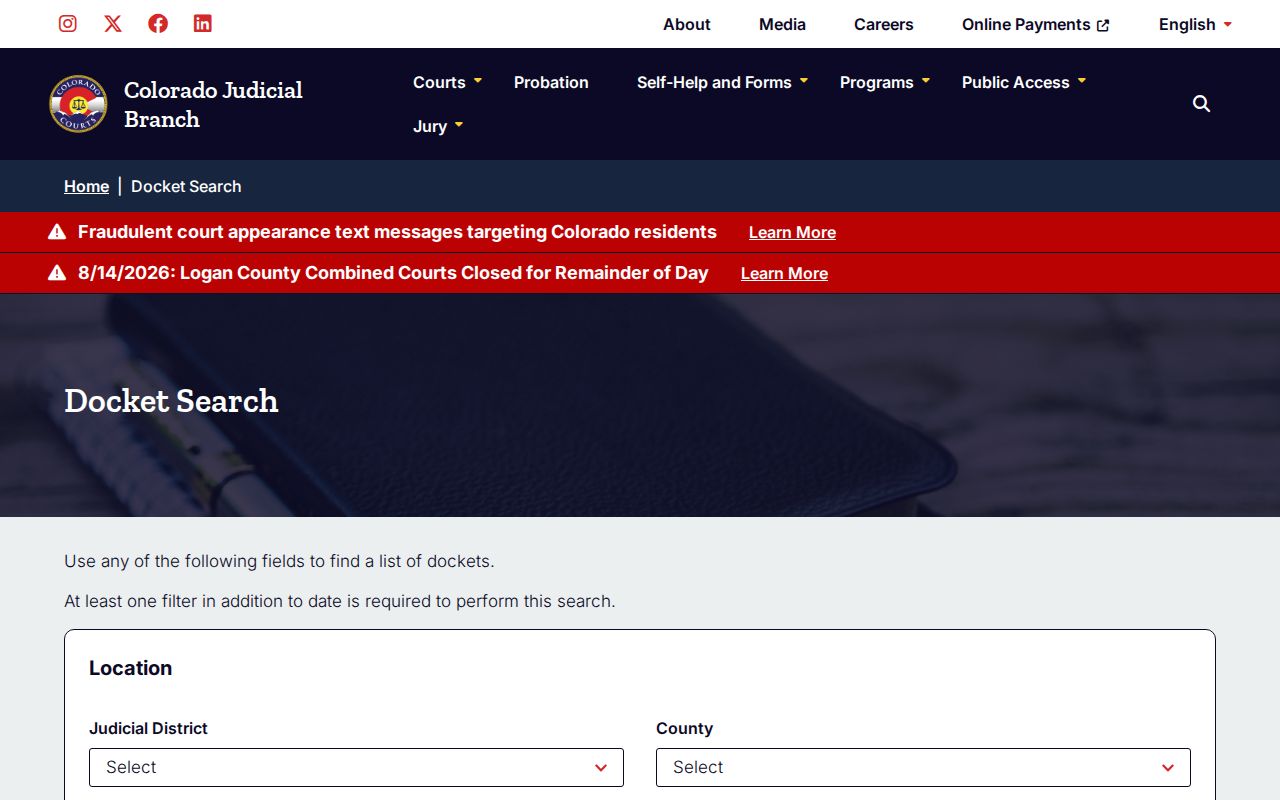
That statewide interface handles Clear Creek County date searches. The originating clerk remains the source of the official case record.
Clear Creek County Cjop Lookup
The Colorado Judicial Online Payment portal, known as Cjop, serves Clear Creek court balances. It can identify eligible ones by case number, ticket number, or name. Select Clear Creek County first. Then choose the search mode and enter the requested identifiers. Complete the CAPTCHA and run the search. After picking the correct case, the user proceeds through review and authorization. Automatic payments are not available.
The official Cjop screen below makes its purpose plain. It is a payment and case-identification channel. It is not a public reader for the full docket history.
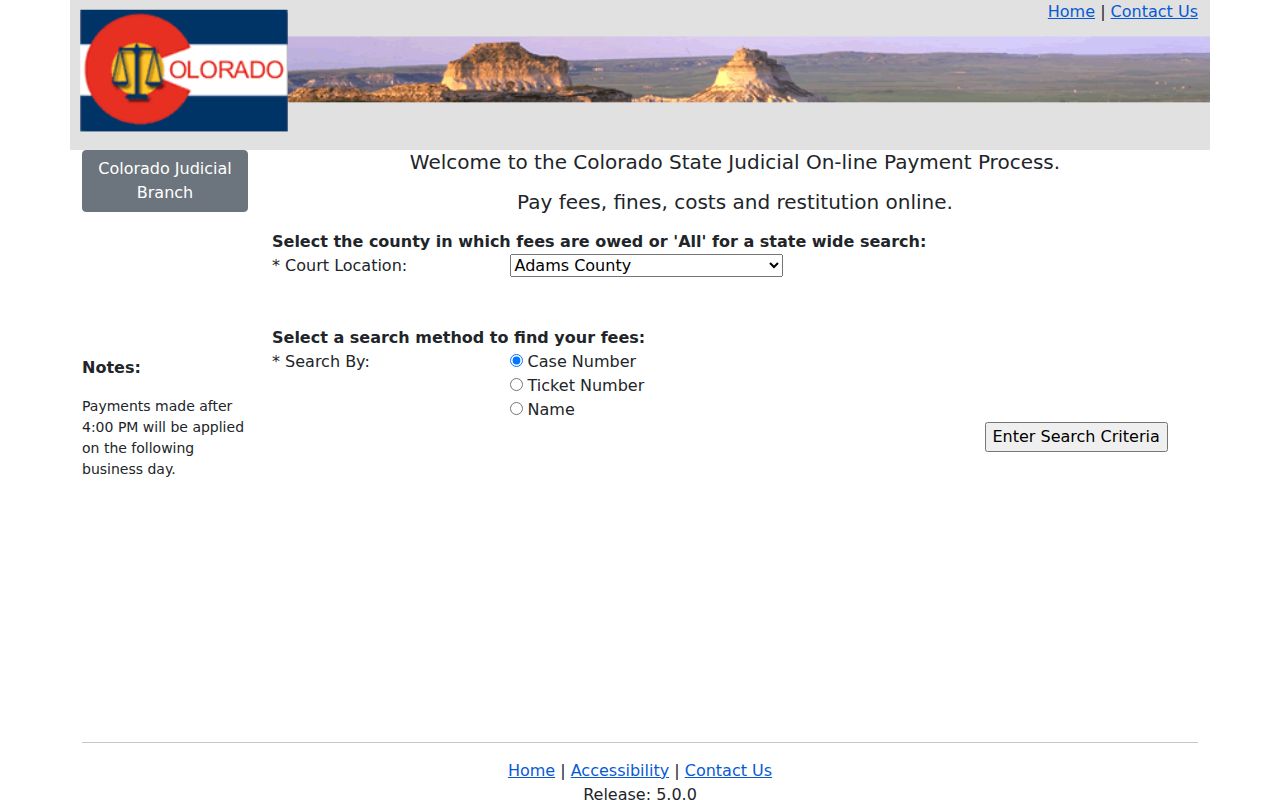
A Cjop match may answer one narrow question. It tells you whether an eligible balance can be paid online. It does not explain every financial entry, filing, or court order. Never treat it as a substitute for the Register of Actions.
E-filing is a separate tool again. Colorado Courts E-Filing and its non-attorney service submit eligible documents to the court. But an e-filing account is not a general public case-search portal. A courthouse counter request runs the other direction; it is a records route, not an online filing step. Keeping each channel tied to its actual purpose avoids false conclusions.
Request Clear Creek County Case History
When the Clear Creek County case lookup must reach beyond the next hearing, send a focused records request to the Clerk of Court. That office serves Clear Creek County Combined Courts. Ask for the Register of Actions. Or ask for a specific document by title and docket date. The local form says to allow three to five business days. It also lists potential charges. These cover copies, non-party searches that include the Register of Actions, research and redaction, certification, retrieval, and postage.
Submit to Clear Creek Combined Courts, Attn: Records, at P.O. Box 367 or 405 Argentine Street, Georgetown, Colorado 80444. The clerk email is clearcreekclerk@judicial.state.co.us. The form and the current courthouse page display different fax numbers, so call 303-569-0820 before faxing. A counter visit helps with inspection and identity questions. But confirm any public-terminal availability before making the trip.
Judicial case records sit under court-specific access authority. That includes Chief Justice Directive 05-01 and applicable Colorado court rules. They are not ordinary county administrative records routed through the Colorado Open Records Act. So ask the judicial clerk. Do not ask the county recorder for the District Court or County Court case file.
Restricted Cases and Access Rules
Some Clear Creek County cases never show up in a docket search. Sealed criminal files, juvenile records, adoptions, and protected family matters can be withheld by statute. A court rule or a judge's order can do it too. The same goes for personal identifiers the court keeps under wraps. A protection-order hearing might show on the criminal docket. But the addresses behind it stay controlled. If a case is missing from public court records, treat that as a wall, not a puzzle to solve.
The Colorado Judicial Branch sealed-case channel does only what it allows. It opens no back door. An authorized party may have to call the clerk. That person must prove identity or a relationship to the case. Want a record sealed or unsealed? You must use the right current form, the governing statute, proper notice, and a court order fitting that class of case.
The rulebook behind all this is Chief Justice Directive 05-01. C.R.C.P. 121 section 1-5 sets limits on civil files. Crim. P. 55.1 governs public access to criminal cases. C.R.S. section 19-1-304 wraps juvenile material in extra protection. The Colorado Open Records Act and the Criminal Justice Records Act handle other public and justice records. Court case files, though, sit outside administrative-record procedures entirely.
No result is not proof of no case. It may reflect the date filter, no current hearing, municipal jurisdiction, an older file, or lawful access limits.